


Evaluation infrastructure for GUI agent benchmarks, built for OpenAdapt.
OpenAdapt Evals is a unified framework for evaluating GUI automation agents against standardized benchmarks such as Windows Agent Arena (WAA). It provides benchmark adapters, agent interfaces, cloud VM infrastructure (Azure and AWS) for parallel evaluation, and result visualization -- everything needed to go from "I have a GUI agent" to "here are its benchmark scores."

More screenshots
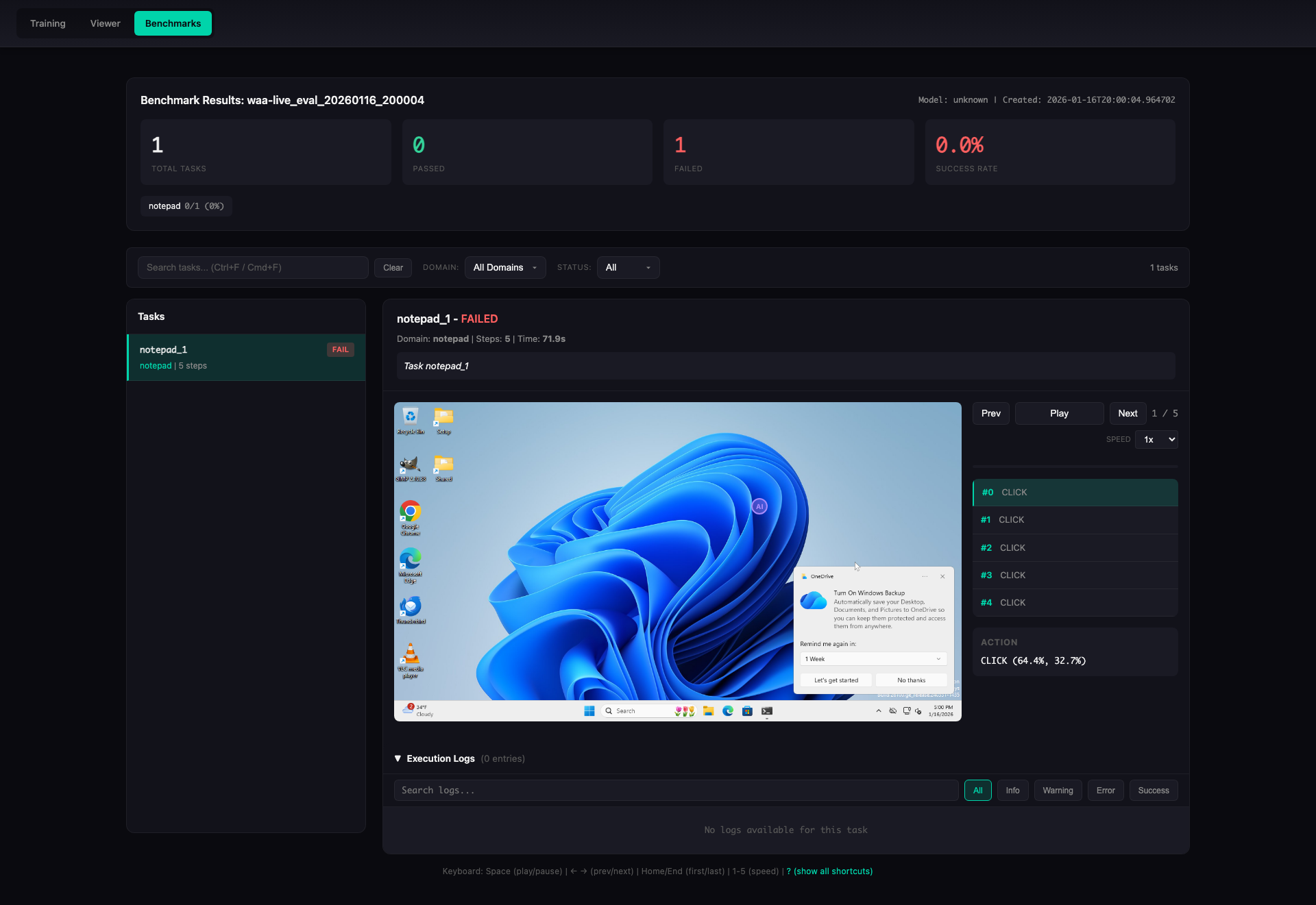
Task Detail View -- step-by-step replay with screenshots, actions, and execution logs:
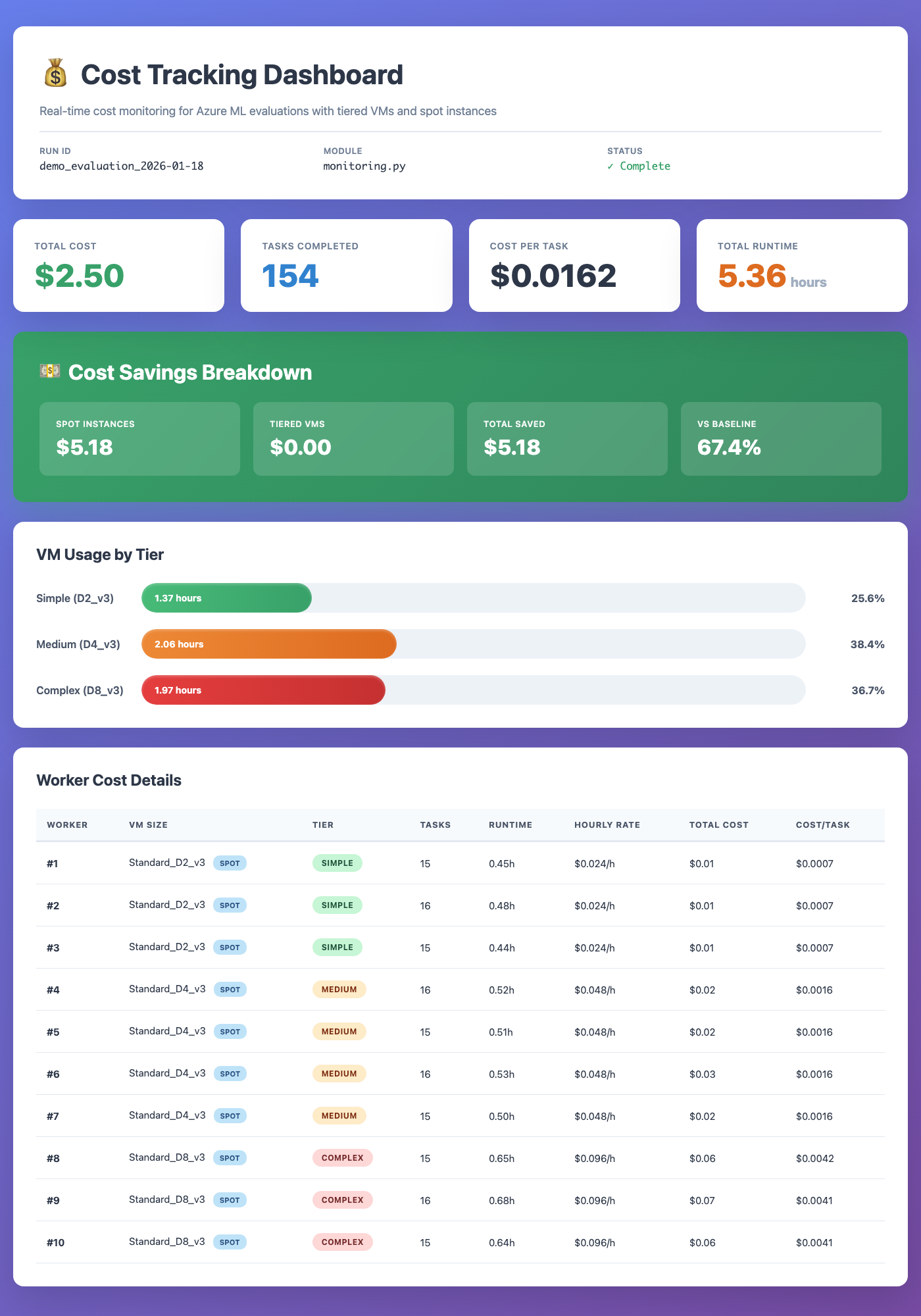
Cost Tracking Dashboard -- real-time VM cost monitoring with tiered sizing and spot instances:
- Benchmark adapters for WAA (live, mock, and local modes), with an extensible base for OSWorld, WebArena, and others
- Task setup handlers --
verify_appsandinstall_appsensure required applications are present on the Windows VM before evaluation begins - Agent interfaces including
ApiAgent(Claude / GPT),ClaudeComputerUseAgent(with coordinate clamping and fail-safe recovery),RetrievalAugmentedAgent,RandomAgent, andPolicyAgent - Multi-cloud VM infrastructure with
AzureVMManager,AWSVMManager,PoolManager,SSHTunnelManager, andVMMonitorfor running evaluations at scale on Azure or AWS - End-to-end eval pipeline (
scripts/run_eval_pipeline.py) -- orchestrates demo generation, VM lifecycle, SSH tunnels, and ZS/DC evaluation in a single command - Deterministic desktop parity mode --
--clean-desktopsuppresses OneDrive/toast/popover noise,--force-tray-iconskeeps network/audio tray controls visible, and run metadata records requested/observed environment flags - RL training environment --
RLEnvironmentwrapper provides a Gymnasium-stylereset/step/evaluateinterface for online RL (GRPO, PPO) with outcome-based rewards from WAA scores - Annotation pipeline -- VLM-based screenshot annotation (
annotation.py,vlm.py) migrated from openadapt-ml so the full record-annotate-evaluate workflow runs within this repo - 4-layer WAA probe --
probe --detailedchecks screenshot capture, accessibility tree, action pipeline, and scoring independently; supports--jsonand--layersfiltering - Demo recording and review -- VNC-based demo capture with auto-persistence (incremental
meta.json, hardlinked PNGs), JPEG thumbnail deduplication, and markdown review artifact generation - CLI tools --
oa-vmfor VM and pool management (50+ commands), benchmark CLI for running evals - Cost optimization -- tiered VM sizing, spot instance support, and real-time cost tracking
- Results visualization -- HTML viewer with step-by-step screenshot replay, execution logs, and domain breakdowns
- Trace export for converting evaluation trajectories into training data
- Configuration via pydantic-settings with automatic
.envloading
pip install openadapt-evalsWith optional dependencies:
pip install openadapt-evals[azure]      # Azure VM management
pip install openadapt-evals[aws]        # AWS EC2 management
pip install openadapt-evals[retrieval]  # Demo retrieval agent
pip install openadapt-evals[viewer]     # Live results viewer
pip install openadapt-evals[all] # Everythingopenadapt-evals mock --tasks 10# Start with a single VM (Azure by default)
oa-vm pool-create --workers 1
oa-vm pool-wait
# Or use AWS
oa-vm pool-create --cloud aws --workers 1
oa-vm pool-wait --cloud aws
# Run evaluation
openadapt-evals run --agent api-claude --task notepad_1
# View results
openadapt-evals view --run-name live_eval
# Clean up (stop billing)
oa-vm pool-cleanup -yfrom openadapt_evals import (
ApiAgent,
WAALiveAdapter,
WAALiveConfig,
evaluate_agent_on_benchmark,
compute_metrics,
)
adapter = WAALiveAdapter(WAALiveConfig(server_url="http://localhost:5001"))
agent = ApiAgent(provider="anthropic")
results = evaluate_agent_on_benchmark(agent, adapter, task_ids=["notepad_1"])
metrics = compute_metrics(results)
print(f"Success rate: {metrics['success_rate']:.1%}")Record demos on a remote VM via VNC, annotate with a VLM, then run demo-conditioned eval:
# 1. Pre-flight check: verify all required apps are installed
python scripts/record_waa_demos.py record-waa \
  --tasks 04d9aeaf,0a0faba3 \
  --server http://localhost:5001 \
  --verify

# 2. Record demos interactively (perform actions on VNC, press Enter after each step)
python scripts/record_waa_demos.py record-waa \
  --tasks 04d9aeaf,0a0faba3 \
  --server http://localhost:5001 \
  --output waa_recordings/

# 3. Annotate recordings with VLM
python scripts/record_waa_demos.py annotate \
  --recordings waa_recordings/ \
  --output annotated_demos/ \
  --provider openai

# 4. Run demo-conditioned eval
python scripts/record_waa_demos.py eval \
  --demo_dir annotated_demos/ \
--tasks 04d9aeaf,0a0faba3For a fully automated flow (demo generation, VM lifecycle, SSH tunnels, ZS and DC evaluation):
# Run for all recordings that have demos
python scripts/run_eval_pipeline.py

# Specific task(s)
python scripts/run_eval_pipeline.py --tasks 04d9aeaf

# Dry run
python scripts/run_eval_pipeline.py --tasks 04d9aeaf --dry-run

# AWS instead of Azure
python scripts/run_eval_pipeline.py --cloud aws --vm-name waa-pool-00

# Deterministic desktop parity + pinned image version metadata
python scripts/run_eval_pipeline.py \
  --tasks 04d9aeaf \
  --clean-desktop \
  --force-tray-icons \
--waa-image-version win11-24h2-2026-03-04# Create a pool of VMs and distribute tasks (Azure)
oa-vm pool-create --workers 5
oa-vm pool-wait
oa-vm pool-run --tasks 50
# Same workflow on AWS
oa-vm pool-create --cloud aws --workers 5
oa-vm pool-wait --cloud aws
oa-vm pool-run --cloud aws --tasks 50
# Or use Azure ML orchestration
openadapt-evals azure --workers 10 --waa-path /path/to/WindowsAgentArenaopenadapt_evals/
├── agents/ # Agent implementations
│ ├── base.py # BenchmarkAgent ABC
│ ├── api_agent.py # ApiAgent (Claude, GPT)
│ ├── claude_computer_use_agent.py # ClaudeComputerUseAgent (coord clamping, fail-safe)
│ ├── retrieval_agent.py# RetrievalAugmentedAgent
│ └── policy_agent.py # PolicyAgent (trained models)
├── adapters/ # Benchmark adapters
│ ├── base.py # BenchmarkAdapter ABC + data classes
│ ├── rl_env.py # RLEnvironment (Gymnasium-style wrapper for GRPO/PPO)
│ └── waa/ # WAA live, mock, and local adapters
├── infrastructure/ # Cloud VM and pool management
│ ├── azure_vm.py # AzureVMManager
│ ├── aws_vm.py # AWSVMManager
│ ├── vm_provider.py # VMProvider protocol (multi-cloud abstraction)
│ ├── pool.py # PoolManager
│ ├── probe.py # 4-layer WAA probe (screenshot, a11y, action, score)
│ ├── ssh_tunnel.py # SSHTunnelManager
│ └── vm_monitor.py # VMMonitor dashboard
├── evaluation/ # Shared evaluation utilities
│ └── metrics.py # fuzzy_match and scoring functions
├── benchmarks/ # Evaluation runner, CLI, viewers
│ ├── runner.py # evaluate_agent_on_benchmark()
│ ├── cli.py # Benchmark CLI (run, mock, live, view, probe)
│ ├── vm_cli.py # VM/Pool CLI (oa-vm, 50+ commands)
│ ├── viewer.py # HTML results viewer
│ ├── pool_viewer.py # Pool results viewer
│ └── trace_export.py # Training data export
├── waa_deploy/ # WAA Docker image & task setup
│ ├── evaluate_server.py# Flask server (port 5050): /setup, /evaluate, /task
│ ├── Dockerfile # QEMU + Windows 11 + pre-downloaded apps
│ └── tools_config.json # App installer URLs and configs
├── annotation.py # VLM-based demo annotation pipeline
├── vlm.py # VLM provider abstraction (OpenAI, Anthropic)
├── server/ # WAA server extensions
├── config.py # Settings (pydantic-settings, .env)
└── __init__.py
scripts/
├── run_eval_pipeline.py # End-to-end eval: demo gen + VM + ZS/DC eval
├── record_waa_demos.py # Record demos via VNC
├── generate_demo_review.py # Markdown review artifacts with thumbnails
├── run_grpo_rollout.py # Example: collect RL rollouts from WAA
├── refine_demo.py # Two-pass LLM demo refinement
└── run_dc_eval.py # Demo-conditioned evaluation
LOCAL MACHINE                          CLOUD VM (Azure or AWS, Ubuntu)
┌─────────────────────┐                ┌──────────────────────────────┐
│  oa-vm CLI          │   SSH Tunnel   │  Docker                      │
│  (pool management)  │ ─────────────> │  ├─ evaluate_server (:5050)  │
│                     │  :5001 → :5000 │  │  └─ /setup, /evaluate     │
│  openadapt-evals    │  :5051 → :5050 │  ├─ Samba share (/tmp/smb/)  │
│  (benchmark runner) │  :8006 → :8006 │  └─ QEMU (Win 11)           │
│                     │                │     ├─ WAA Flask API (:5000) │
│                     │                │     ├─ \\host.lan\Data\      │
│                     │                │     └─ Agent                 │
└─────────────────────┘                └──────────────────────────────┘
Both backends use the same VMProvider protocol. Pass --cloud azure (default) or --cloud aws to any pool command. AWS now supports nested virtualization on C8i/M8i/R8i instances (from ~$0.19/hr, Feb 2026), though GPU families (g5, g6) still require metal instances. Azure uses Standard_D8ds_v5 ($0.38/hr).
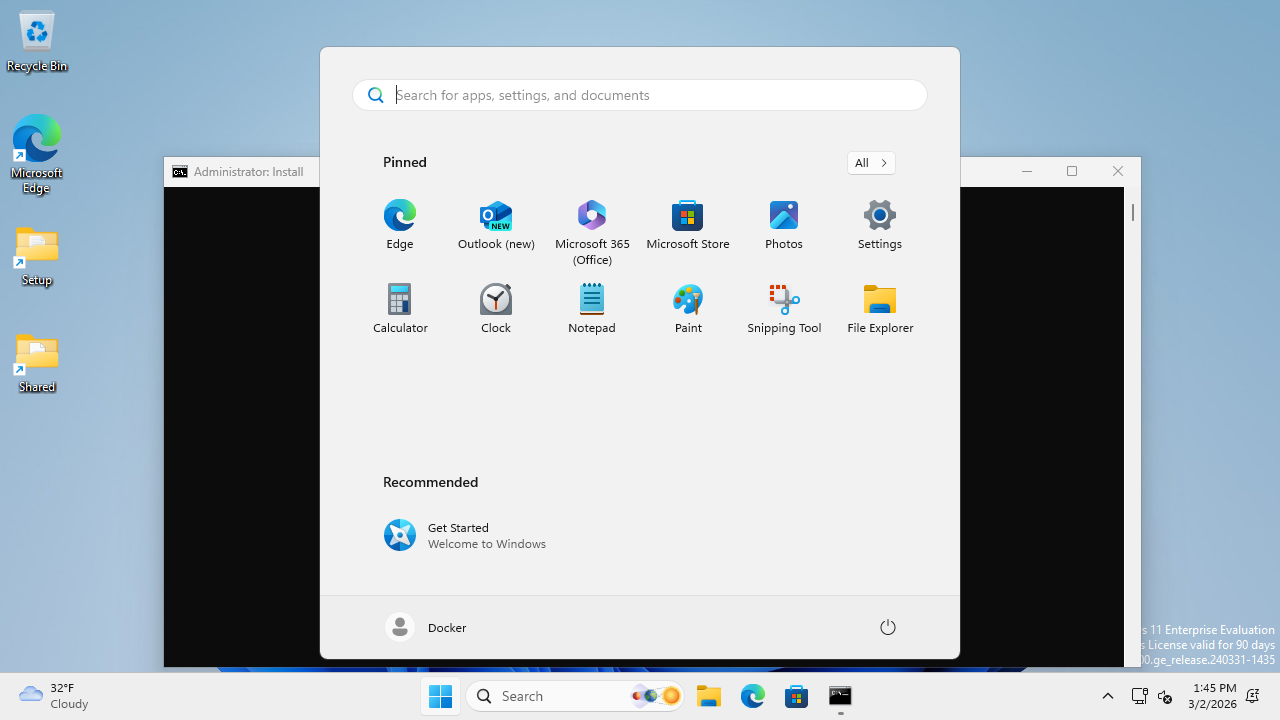
The WAA Docker container runs QEMU with --cap-add NET_ADMIN for TAP networking, which breaks Docker's standard port forwarding for port 5050 (evaluate_server.py). The workaround is a two-stage socat proxy using a UNIX socket:
# Stage 1: Bridge container network namespace to a UNIX socket
CONTAINER_PID=$(docker inspect --format '{{.State.Pid}}' <container_name>)
nsenter -t $CONTAINER_PID -n socat UNIX-LISTEN:/tmp/waa-bridge.sock,fork TCP:localhost:5050

# Stage 2: Expose the UNIX socket as a TCP port on the VM host
socat TCP-LISTEN:5051,fork,reuseaddr UNIX-CONNECT:/tmp/waa-bridge.sock
This makes VM_HOST:5051 forward to container port 5050. Port 5000 (WAA Flask API) uses standard Docker port forwarding and works normally.
After a container restart, remove the stale socket (rm -f /tmp/waa-bridge.sock) and re-run both stages with the new container PID.
For the full networking architecture, SSH tunnel setup, and data flow diagrams, see docs/gpu_e2e_validation/architecture.md.
The evaluate server (waa_deploy/evaluate_server.py) runs on the Docker Linux side (port 5050) and orchestrates task setup on the Windows VM. The /setup endpoint accepts a list of setup handlers:
# Check if required apps are installed on the Windows VM
curl -X POST http://localhost:5051/setup \
  -H "Content-Type: application/json" \
  -d '{"config": [{"type": "verify_apps", "parameters": {"apps": ["libreoffice-calc"]}}]}'
# → 200 if all present, 422 if any missing

# Install missing apps via two-phase pipeline
curl -X POST http://localhost:5051/setup \
  -H "Content-Type: application/json" \
-d '{"config": [{"type": "install_apps", "parameters": {"apps": ["libreoffice-calc"]}}]}'Large installers (e.g. LibreOffice 350MB MSI) can't be downloaded within the WAA server's 120s command timeout. The install_apps handler solves this with a two-phase approach:
- Download on Linux -- the evaluate server downloads the installer to the Samba share (
/tmp/smb/=\\host.lan\Data\on Windows), with no timeout constraint - Install on Windows -- a small PowerShell script is written to the Samba share and executed via the WAA server, running only
msiexec(fast, no download)
The Dockerfile also pre-downloads LibreOffice at build time with dynamic version discovery, so first-boot installs work without depending on mirror availability.
When a task config includes related_apps, the live adapter automatically prepends a verify_apps step before the task's setup config. The --verify flag on record_waa_demos.py provides a pre-flight check across all tasks before starting a recording session.

| Command | Description |
|---|---|
run |
Run live evaluation (localhost:5001 default) |
mock |
Run with mock adapter (no VM required) |
live |
Run against a WAA server (full control) |
eval-suite |
Automated full-cycle evaluation (ZS + DC) |
azure |
Run parallel evaluation on Azure ML |
probe |
Check WAA readiness (--detailed for 4-layer diagnostics, --json, --layers) |
view |
Generate HTML viewer for results |
estimate |
Estimate Azure costs |
| Command | Description |
|---|---|
pool-create |
Create N VMs with Docker and WAA |
pool-wait |
Wait until WAA is ready on all workers |
pool-run |
Distribute tasks across pool workers |
pool-status |
Show status of all pool VMs |
pool-pause |
Deallocate pool VMs (stop billing) |
pool-resume |
Restart deallocated pool VMs |
pool-cleanup |
Delete all pool VMs and resources |
image-create |
Create golden image from a pool VM |
image-list |
List available golden images |
vm monitor |
Dashboard with SSH tunnels |
vm setup-waa |
Deploy WAA container on a VM |
smoke-test-aws |
Verify AWS credentials, AMI, VPC, lifecycle |
All pool commands accept --cloud azure (default) or --cloud aws.
Run oa-vm --help for the full list of 50+ commands.
Settings are loaded automatically from environment variables or a .env file in the project root via pydantic-settings.
# .env
ANTHROPIC_API_KEY=sk-ant-...
OPENAI_API_KEY=sk-...

# Azure (for --cloud azure VM management)
AZURE_SUBSCRIPTION_ID=...
AZURE_ML_RESOURCE_GROUP=...
AZURE_ML_WORKSPACE_NAME=...
AWS credentials are resolved via boto3's default credential chain. SSO (IAM Identity Center) is recommended for interactive use:
# One-time setup — opens a guided wizard
aws configure sso
# Prompts for: SSO start URL, region, account, role name, profile name

# Login (opens browser, caches short-lived token)
aws sso login

# Verify it works
oa-vm smoke-test-aws

# All oa-vm --cloud aws commands now work automatically
oa-vm pool-create --cloud aws --workers 1
Example ~/.aws/config for SSO
[default]
sso_session = my-org
sso_account_id = 111122223333
sso_role_name = PowerUserAccess
region = us-east-1

[sso-session my-org]
sso_start_url = https://my-org.awsapps.com/start
sso_region = us-east-1
sso_registration_scopes = sso:account:access
Static keys (AWS_ACCESS_KEY_ID / AWS_SECRET_ACCESS_KEY in .env) also work but are not recommended for interactive use -- they don't expire and are a security risk if leaked.
See openadapt_evals/config.py for all available settings.
Implement the BenchmarkAgent interface to evaluate your own agent:
from openadapt_evals import BenchmarkAgent, BenchmarkAction, BenchmarkObservation, BenchmarkTask

class MyAgent(BenchmarkAgent):
    def act(
        self,
        observation: BenchmarkObservation,
        task: BenchmarkTask,
        history: list[tuple[BenchmarkObservation, BenchmarkAction]] | None = None,
    ) -> BenchmarkAction:
        # Your agent logic here
        return BenchmarkAction(type="click", x=0.5, y=0.5)

    def reset(self) -> None:
passWe welcome contributions. To get started:
git clone https://github.com/OpenAdaptAI/openadapt-evals.git
cd openadapt-evals
uv sync --extra dev
uv run pytest tests/ -v
See CLAUDE.md for development conventions and architecture details.
| Project | Description |
|---|---|
| OpenAdapt | Desktop automation with demo-conditioned AI agents |
| openadapt-ml | Training and policy runtime |
| openadapt-capture | Screen recording and demo sharing |
| openadapt-consilium | Multi-model consensus library |
| openadapt-grounding | UI element localization |