



Python finite-state machines and statecharts made easy.

Welcome to python-statemachine, an intuitive and powerful state machine library designed for a great developer experience. Define flat state machines or full statecharts with compound states, parallel regions, and history — all with a clean, pythonic, declarative API that works in both sync and async Python codebases.
>>> from statemachine import StateChart, State

>>> class TrafficLightMachine(StateChart):
...     "A traffic light machine"
...     green = State(initial=True)
...     yellow = State()
...     red = State()
...
...     cycle = (
...         green.to(yellow)
...         | yellow.to(red)
...         | red.to(green)
...     )
...
...     def before_cycle(self, event: str, source: State, target: State):
...         return f"Running {event} from {source.id} to {target.id}"
...
...     def on_enter_red(self):
...         print("Don't move.")
...
...     def on_exit_red(self):
...         print("Go ahead!")
Create an instance and send events:
>>> sm = TrafficLightMachine()
>>> sm.send("cycle")
'Running cycle from green to yellow'

>>> sm.send("cycle")
Don't move.
'Running cycle from yellow to red'

>>> sm.send("cycle")
Go ahead!
'Running cycle from red to green'
Check which states are active:
>>> sm.configuration
OrderedSet([State('Green', id='green', value='green', initial=True, final=False, parallel=False)])

>>> sm.green.is_active
True
Generate a diagram:
>>> # This example will only run on automated tests if dot is present
>>> getfixture("requires_dot_installed")
>>> img_path = "docs/images/readme_trafficlightmachine.png"
>>> sm._graph().write_png(img_path)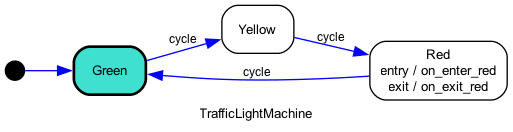
Parameters are injected into callbacks automatically — the library inspects the signature and provides only the arguments each callback needs:
>>> sm.send("cycle")
'Running cycle from green to yellow'Use cond= and unless= to add guards. When multiple transitions share the same
event, declaration order determines priority:
>>> from statemachine import StateChart, State

>>> class ApprovalWorkflow(StateChart):
...     pending = State(initial=True)
...     approved = State(final=True)
...     rejected = State(final=True)
...
...     review = (
...         pending.to(approved, cond="is_valid")
...         | pending.to(rejected)
...     )
...
...     def is_valid(self, score: int = 0):
...         return score >= 70

>>> sm = ApprovalWorkflow()
>>> sm.send("review", score=50)
>>> sm.rejected.is_active
True

>>> sm = ApprovalWorkflow()
>>> sm.send("review", score=85)
>>> sm.approved.is_active
True
The first transition whose guard passes wins. When score < 70, is_valid returns
False so the second transition (no guard — always matches) fires instead.
Break complex behavior into hierarchical levels with State.Compound. Entering a
compound activates both the parent and its initial child. Exiting removes the
parent and all descendants:
>>> from statemachine import StateChart, State

>>> class DocumentWorkflow(StateChart):
...     class editing(State.Compound):
...         draft = State(initial=True)
...         review = State()
...         submit = draft.to(review)
...         revise = review.to(draft)
...
...     published = State(final=True)
...     approve = editing.to(published)

>>> sm = DocumentWorkflow()
>>> set(sm.configuration_values) == {"editing", "draft"}
True

>>> sm.send("submit")
>>> "review" in sm.configuration_values
True

>>> sm.send("approve")
>>> set(sm.configuration_values) == {"published"}
TrueState.Parallel activates all child regions simultaneously. Events in one
region don't affect others. A done.state event fires only when all
regions reach a final state:
>>> from statemachine import StateChart, State

>>> class DeployPipeline(StateChart):
...     validate_disconnected_states = False
...     class deploy(State.Parallel):
...         class build(State.Compound):
...             compiling = State(initial=True)
...             compiled = State(final=True)
...             finish_build = compiling.to(compiled)
...         class tests(State.Compound):
...             running = State(initial=True)
...             passed = State(final=True)
...             finish_tests = running.to(passed)
...     released = State(final=True)
...     done_state_deploy = deploy.to(released)

>>> sm = DeployPipeline()
>>> "compiling" in sm.configuration_values and "running" in sm.configuration_values
True

>>> sm.send("finish_build")
>>> "compiled" in sm.configuration_values and "running" in sm.configuration_values
True

>>> sm.send("finish_tests")
>>> set(sm.configuration_values) == {"released"}
TrueHistoryState() records which child was active when a compound is exited.
Re-entering via the history pseudo-state restores the previous child instead
of starting from the initial one:
>>> from statemachine import HistoryState, StateChart, State

>>> class EditorWithHistory(StateChart):
...     validate_disconnected_states = False
...     class editor(State.Compound):
...         source = State(initial=True)
...         visual = State()
...         h = HistoryState()
...         toggle = source.to(visual) | visual.to(source)
...     settings = State()
...     open_settings = editor.to(settings)
...     back = settings.to(editor.h)

>>> sm = EditorWithHistory()
>>> sm.send("toggle")
>>> "visual" in sm.configuration_values
True

>>> sm.send("open_settings")
>>> sm.send("back")
>>> "visual" in sm.configuration_values
True
Use HistoryState(deep=True) for deep history that remembers the exact leaf
state across nested compounds.
Transitions without an event trigger fire automatically. With a guard, they fire after any event processing when the condition is met:
>>> from statemachine import StateChart, State

>>> class AutoCounter(StateChart):
...     counting = State(initial=True)
...     done = State(final=True)
...
...     counting.to(done, cond="limit_reached")
...     increment = counting.to.itself(internal=True, on="do_increment")
...
...     count = 0
...
...     def do_increment(self):
...         self.count += 1
...     def limit_reached(self):
...         return self.count >= 3

>>> sm = AutoCounter()
>>> sm.send("increment")
>>> sm.send("increment")
>>> "counting" in sm.configuration_values
True

>>> sm.send("increment")
>>> "done" in sm.configuration_values
TrueWhen using StateChart, runtime exceptions in callbacks are caught and
turned into error.execution events. Define a transition for that event
to handle errors within the state machine itself:
>>> from statemachine import StateChart, State

>>> class ResilientService(StateChart):
...     running = State(initial=True)
...     failed = State(final=True)
...
...     process = running.to(running, on="do_work")
...     error_execution = running.to(failed)
...
...     def do_work(self):
...         raise RuntimeError("something broke")

>>> sm = ResilientService()
>>> sm.send("process")
>>> sm.failed.is_active
True
Async callbacks just work — same API, no changes needed. The engine detects async callbacks and switches to the async engine automatically:
>>> import asyncio
>>> from statemachine import StateChart, State

>>> class AsyncWorkflow(StateChart):
...     idle = State(initial=True)
...     done = State(final=True)
...
...     finish = idle.to(done)
...
...     async def on_finish(self):
...         return 42

>>> async def run():
...     sm = AsyncWorkflow()
...     result = await sm.finish()
...     print(f"Result: {result}")
...     print(sm.done.is_active)

>>> asyncio.run(run())
Result: 42
TrueThere's a lot more to explore:
- DoneData on final states — pass structured data to
done.statehandlers - Delayed events — schedule events with
sm.send("event", delay=500) In(state)conditions — cross-region guards in parallel statesprepare_eventcallback — inject custom data into all callbacks- Observer pattern — register external listeners to watch events and state changes
- Django integration — auto-discover state machines in Django apps with
MachineMixin - Diagram generation — from the CLI, at runtime, or in Jupyter notebooks
- Dictionary-based definitions — create state machines from data structures
- Internationalization — error messages in multiple languages
Full documentation: https://python-statemachine.readthedocs.io
pip install python-statemachine
To generate diagrams, install with the diagrams extra (requires
Graphviz):
pip install python-statemachine[diagrams]
-
If you found this project helpful, please consider giving it a star on GitHub.
-
Contribute code: If you would like to contribute code, please submit a pull request. For more information on how to contribute, please see our contributing.md file.
-
Report bugs: If you find any bugs, please report them by opening an issue on our GitHub issue tracker.
-
Suggest features: If you have an idea for a new feature, or feel something is harder than it should be, please let us know by opening an issue on our GitHub issue tracker.
-
Documentation: Help improve documentation by submitting pull requests.
-
Promote the project: Help spread the word by sharing on social media, writing a blog post, or giving a talk about it. Tag me on Twitter @fgmacedo so I can share it too!


![@dependabot[bot]](https://avatars.githubusercontent.com/in/29110?s=64&v=4)


