Example Nerves project demonstrating ExRatatui on embedded hardware. Ships two TUI applications — a BEAM system monitor and an LED controller — that work on any machine. On a Raspberry Pi they render directly to the HDMI console, are reachable over SSH, and can be attached to over Erlang distribution from any BEAM node on the network with no NIF or terminal needed on the Pi.
The point of this repo is to show that any Nerves codebase can easily ship a real terminal UI, using ExRatatui's SSH and distribution transports.
git clone https://github.com/mcass19/nerves_ex_ratatui_example.git
cd nerves_ex_ratatui_example
mix deps.get
mix run -e "SystemMonitorTui.run()" # BEAM + host system dashboard
mix run -e "LedTui.run()" # LED control (simulation on non-Nerves)Press q to quit either TUI.
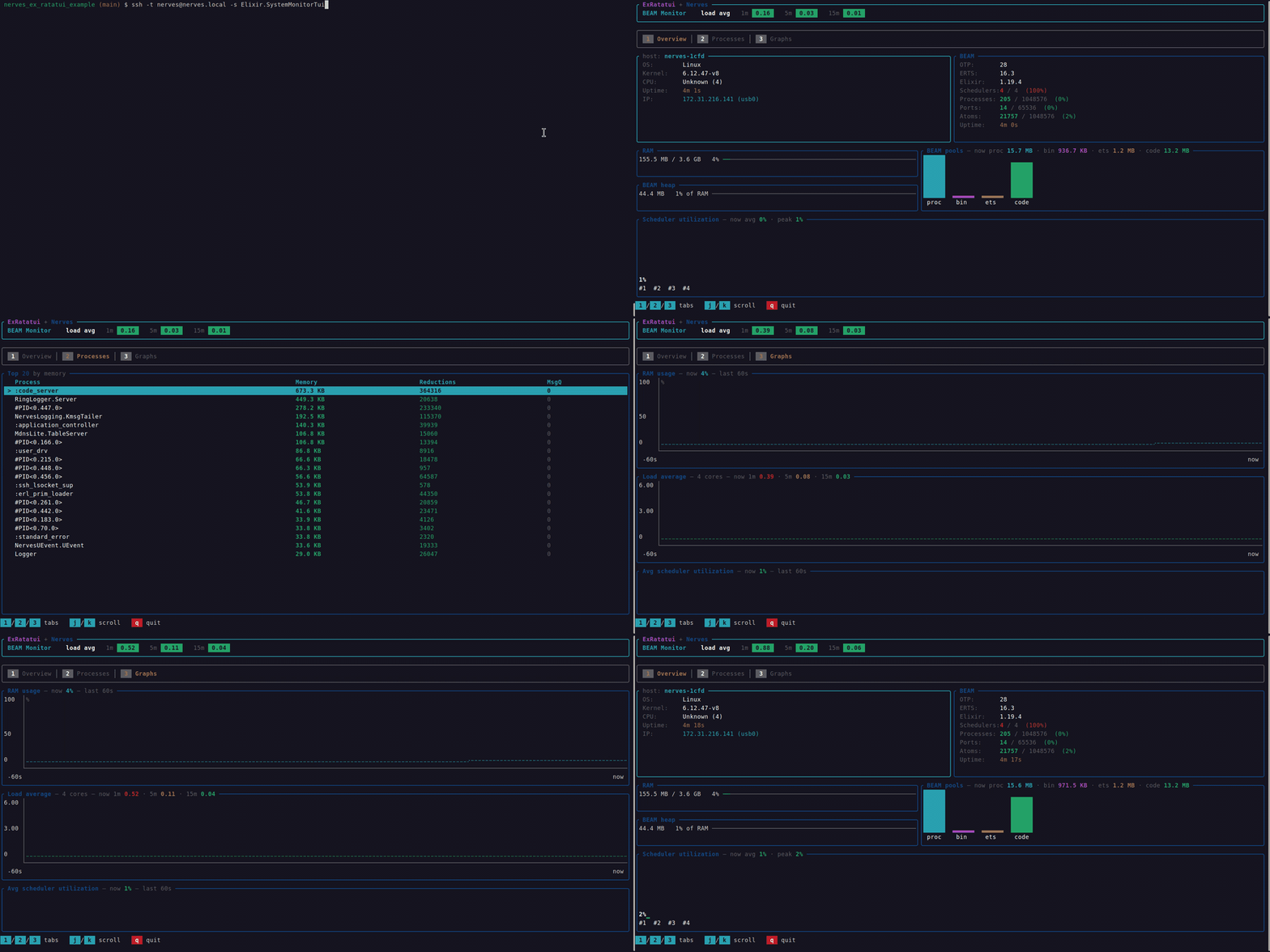
A btop/fastfetch-inspired BEAM system monitor with a three-tab dashboard, refreshed once per second. The heavy /proc reads run off the server process via Command.async/2 so the UI never blocks. See the reducer runtime guide.
| Tab | What it shows |
|---|---|
| 1 · Overview | Host info (OS, kernel, CPU, uptime, IP) · BEAM info (OTP/ERTS/Elixir, schedulers, processes/ports/atoms, BEAM uptime) · RAM & BEAM heap as LineGauges · BEAM memory pools (BarChart) · Per-scheduler utilization (BarChart) |
| 2 · Processes | Top 20 processes by memory in a Table — memory, reductions, message queue length; scrollable with j/k |
| 3 · Graphs | Rolling 60-second time series: RAM % (Chart line), load average 1m/5m/15m (Chart with three datasets), average scheduler utilization (Sparkline) |
| Key | Action |
|---|---|
1 / 2 / 3 |
Switch tabs (Overview / Processes / Graphs) |
j / Down |
Scroll down in process table |
k / Up |
Scroll up in process table |
q |
Quit |
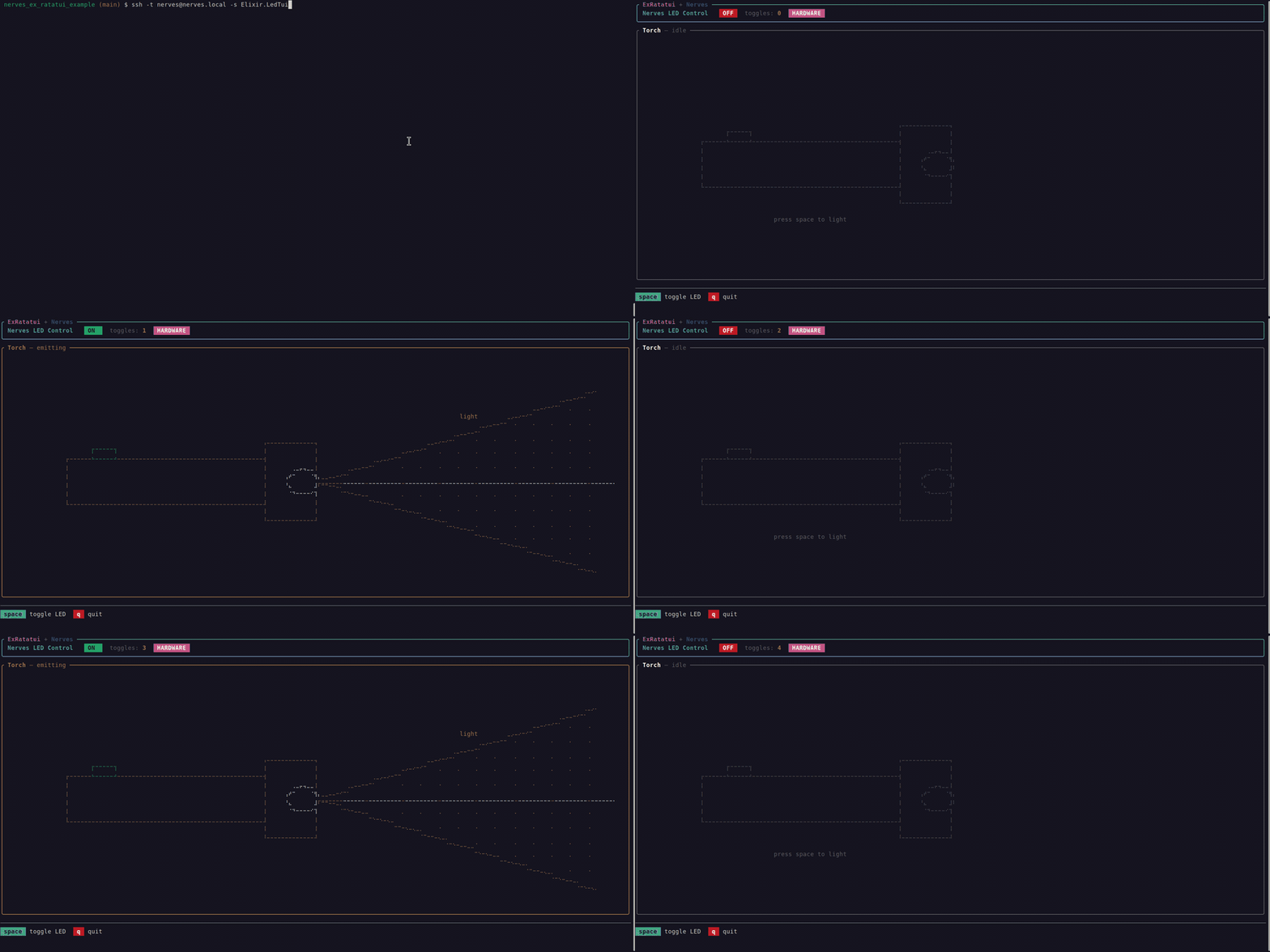
Toggle the Raspberry Pi's onboard green ACT LED from a TUI. No external wiring needed. When the LED sysfs path is not available (laptop, CI), the TUI runs in simulation mode where everything works identically but no hardware is toggled.
The body is an ExRatatui.Widgets.Canvas that draws a torch: when the LED is off the torch is rendered in muted grays; when it's on, a yellow light beam is projected from the bulb, filled with scattered Points for a "sparkle" effect.
| Key | Action |
|---|---|
space |
Toggle LED |
q |
Quit |
- Raspberry Pi (any model — RPi Zero, 3, 4, 5 all have an ACT LED)
- Micro SD card
- HDMI display + USB keyboard or a network connection for SSH
export MIX_TARGET=rpi4    # or rpi0, rpi3, rpi5, etc.
mix deps.get
mix firmware
mix burn                  # insert SD card first
Over-the-air updates after the first deploy:
mix firmware
mix upload nerves.localConnect HDMI + USB keyboard, power on, and at the IEx prompt:
iex> SystemMonitorTui.run()
iex> LedTui.run()Both TUIs are registered as SSH subsystems via the nerves_ssh daemon that ships with nerves_pack. From any machine whose public key is in your ~/.ssh/:
ssh -t nerves@nerves.local -s Elixir.SystemMonitorTui
ssh -t nerves@nerves.local -s Elixir.LedTui
The -t is required: OpenSSH doesn't allocate a PTY by default for -s (subsystem) mode, and without one your local terminal stays in cooked mode — keystrokes get line-buffered and echoed locally on top of the TUI, and the alt-screen teardown on disconnect bleeds into your shell prompt.
The TUI runs entirely on the device — the SSH channel just shuttles render bytes to your terminal and key events back to the Pi. Quit with q and the channel cleans up its alt-screen on the way out, leaving your scrollback intact.
Plain ssh nerves@nerves.local (no -s) still drops you into the regular Nerves IEx shell, so the manual iex> SystemMonitorTui.run() path keeps working unchanged.
How it works:
ExRatatui.SSH.subsystem/1plugs anExRatatui.Appmodule into the OTP:ssh.subsystem_spec()shape thatnerves_sshalready speaks. Each connected client gets its own isolated TUI session — multiplesshclients to the same Pi are independent. See the SSH transport guide in the ex_ratatui docs for the full architecture.
The subsystem name is the full Elixir module name as a charlist, so multiple TUIs in the same firmware get distinct names and don't collide. See test/ssh_subsystems_test.exs for the spec-shape checks.
Both TUIs have ExRatatui.Distributed.Listeners in the supervision tree. Any BEAM node that shares the same cookie can attach from the network — the Pi runs the TUI callbacks and sends widget structs as plain BEAM terms; the connected node renders them with its own NIF. No Rust toolchain or cross-compilation needed on the device for distribution sessions.
From the IEx prompt on the Pi (via SSH or HDMI), check which interface has an address — USB gadget, Ethernet, or WiFi:
iex> VintageNet.get(["interface", "usb0", "addresses"])
iex> VintageNet.get(["interface", "eth0", "addresses"])
iex> VintageNet.get(["interface", "wlan0", "addresses"])
Look for the %{family: :inet, address: {a, b, c, d}} entry. For USB gadget mode it's typically something like 172.31.216.141.
EPMD (Erlang Port Mapper Daemon) doesn't run by default on Nerves — start it first, then make the device a distributed node:
iex> System.cmd("epmd", ["-daemon"])
{"", 0}
iex> Node.start(:"nerves@172.31.216.141", :longnames)
{:ok, _}
Replace the IP with the address you found in step 1.
iex> Node.get_cookie()
:"NKJH..."
Copy this value. Your node needs the same cookie to connect.
With ex_ratatui on the code path, start a node on the same subnet. For USB gadget mode the dev machine is typically one IP away (e.g. 172.31.216.142):
iex --name dev@172.31.216.142 --cookie <cookie-from-step-3> -S mix
iex> ExRatatui.Distributed.attach(:"nerves@172.31.216.141", SystemMonitorTui, listener: :system_monitor_dist)
iex> ExRatatui.Distributed.attach(:"nerves@172.31.216.141", LedTui, listener: :led_tui_dist)
The listener: option tells attach/3 which named Listener to connect to — each TUI has its own (:system_monitor_dist, :led_tui_dist). Quit with q.
Why distribution? SSH shuttles rendered ANSI bytes over the wire, so the device loads the NIF and does all the rendering. Distribution sends the raw widget structs instead — the connected node renders them locally. This means the Pi never touches the Rust NIF for distribution sessions, which is ideal for constrained devices or targets where cross-compiling the NIF is inconvenient. Both transports coexist in the same firmware.
- ex_ratatui — the underlying Elixir bindings to Rust ratatui, including the SSH transport guide and distribution transport guide.
- phoenix_ex_ratatui_example — the Phoenix counterpart to this project: an admin TUI served over SSH and distribution alongside a public LiveView, sharing PubSub between the browser and the terminal. Same library, different deployment shape.
MIT — see LICENSE for details.