


Cascade orchestrates AI agents (Claude Code, Codex, opencode, LLMist) across your workflows in GitHub, Trello, and Jira.
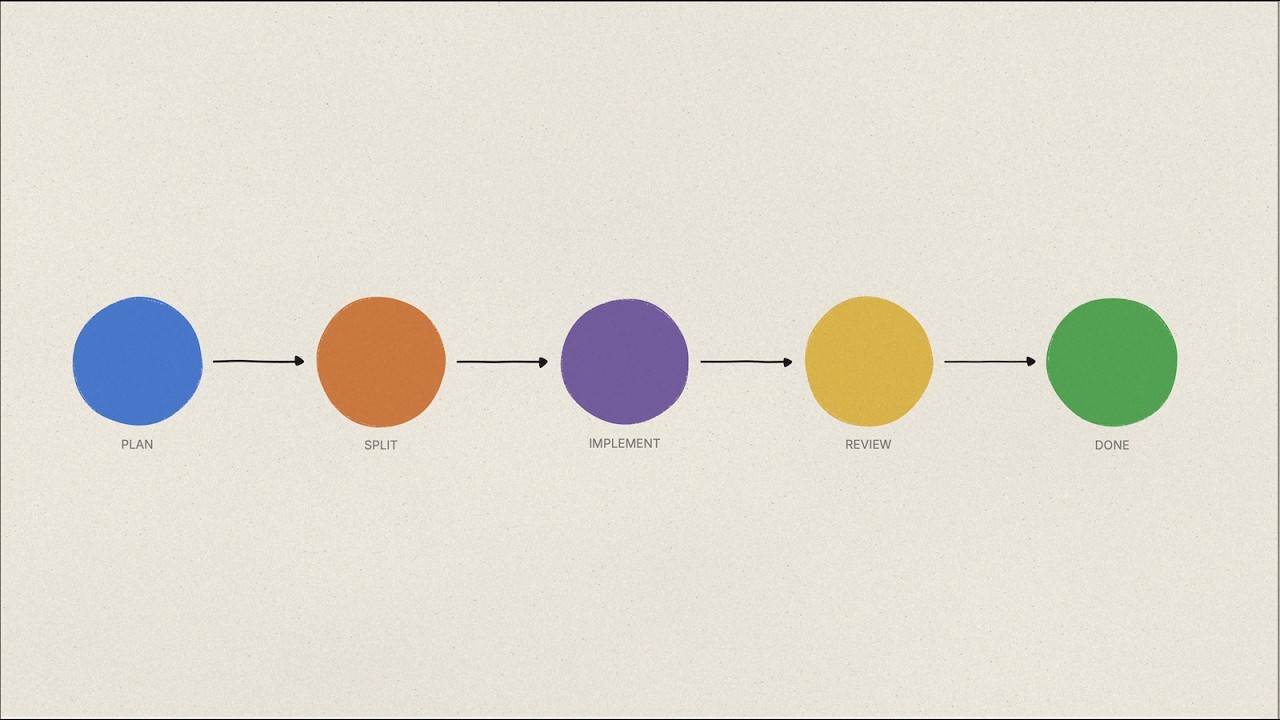
Cascade is an open-source platform that automates the full software development lifecycle. Connect your PM tool and GitHub repository, and Cascade drives work items from plan to merge:
PM Card → Split → Plan → Implement → PR → Review → Iterate → Merge

git clone https://github.com/mongrel-intelligence/cascade.git
cd cascade
cp .env.docker.example .env    # Edit if needed
bash setup.sh                  # Build, migrate, and start all services
docker compose exec dashboard node dist/tools/create-admin-user.mjs \
  --email admin@example.com --password changeme --name "Admin"
Open http://localhost:3001 and log in with your admin credentials.
For the full setup walkthrough — projects, credentials, webhooks, and triggers — see Getting Started.
- Multi-PM support — Works with Trello and JIRA out of the box
- 11 agent types — Splitting, planning, implementation, review, debug, respond-to-review, respond-to-CI, and more
- Dual-persona GitHub model — Separate implementer and reviewer bot accounts to prevent feedback loops
- Web dashboard + CLI — Monitor runs, manage projects, configure triggers
- Extensible trigger system — Add new events without touching core logic
- Pluggable agent engines —
claude-code(default),llmist,codex, andopencodebuilt-in; easy to extend - Credential encryption — AES-256-GCM encryption for all stored secrets
- Agent resilience — Built-in rate limiting, exponential-backoff retry, and context compaction

Cascade runs as three independent services:
| Service | Entry Point | Role |
|---|---|---|
| Router | src/router/index.ts |
Receives webhooks, enqueues jobs to Redis via BullMQ |
| Worker | src/worker-entry.ts |
Processes one job per container, exits when done |
| Dashboard | src/dashboard.ts |
Serves the API (tRPC) and web UI |
| Agent | Trigger | What it does |
|---|---|---|
splitting |
PM status change | Splits a large card into smaller work items |
planning |
PM status change | Creates a detailed implementation plan on the card |
implementation |
PM status change | Writes code and opens a pull request |
review |
CI pass / PR opened / review requested | Reviews a pull request |
respond-to-review |
Reviewer requests changes | Addresses review feedback |
respond-to-ci |
CI failure | Diagnoses and fixes failing CI checks |
respond-to-pr-comment |
PR comment | Responds to comments on a PR |
respond-to-planning-comment |
Planning card comment | Updates the plan based on feedback |
debug |
Session log uploaded | Analyzes agent session logs and creates a debug card |
resolve-conflicts |
Merge conflict detected | Resolves git merge conflicts |
backlog-manager |
Scheduled / manual | Manages and prioritizes the backlog |
Prerequisites: Node.js 22+, PostgreSQL, Redis
npm install && cd web && npm install && cd ..
cp .env.example .env    # Set DATABASE_URL and REDIS_URL
npm run db:migrate
Start all three services with one command (requires a build first):
npm run build
npm run dev:all   # Router + Dashboard API + Frontend, color-coded output
Or start each service in a separate terminal:
npm run dev                                        # Router (:3000)
node --env-file=.env dist/dashboard.js             # Dashboard API (:3001)
npm run dev:web                                    # Frontend (Vite, :5173)
Note: The Vite dev server proxies
/trpcand/apitolocalhost:3001, so the Dashboard API must be running for the frontend to work.
| Command | Description |
|---|---|
npm test |
Run unit tests (Vitest) |
npm run test:integration |
Run integration tests (requires PostgreSQL) |
npm run lint |
Check code style (Biome) |
npm run lint:fix |
Auto-fix lint issues |
npm run typecheck |
TypeScript type checking |
npm run build |
Compile TypeScript to dist/ |
npm run db:migrate |
Apply pending migrations |
npm run db:studio |
Open Drizzle Studio |
npm run dev:all |
Start all services (router + dashboard + frontend) |
npm run verify |
Lint + typecheck + unit tests (pre-PR check) |
The included docker-compose.yml runs all services with a single command. Workers are spawned dynamically by the Router via Docker socket.
| Image | Dockerfile | Purpose |
|---|---|---|
| Dashboard + Frontend | Dockerfile.selfhosted |
API server + web UI (combined) |
| Router | Dockerfile.router |
Webhook receiver, worker orchestration |
| Worker | Dockerfile.worker |
Full agent runtime (clones repos, runs AI) |
Required production environment variables:
DATABASE_URL=postgresql://user:pass@host:5432/cascade
REDIS_URL=redis://your-redis-host:6379
CREDENTIAL_MASTER_KEY=<64-char hex>   # Generate: openssl rand -hex 32
All project-level credentials (GitHub tokens, PM keys, LLM API keys) are stored in the database and managed through the dashboard or CLI.
Dual-persona GitHub model — Cascade uses two separate GitHub bot accounts per project (implementer and reviewer) to prevent feedback loops. The implementer writes code and creates PRs; the reviewer reviews and approves them.
Trigger system — Events from Trello, JIRA, and GitHub webhooks are matched against registered TriggerHandler instances. Triggers are configured per-project in the database.
Agent engines — Agents run through a shared execution lifecycle with a pluggable engine registry. Default engine is claude-code (Anthropic Claude Code SDK). Alternatives: llmist (supports OpenRouter, Anthropic, OpenAI), codex (OpenAI Codex CLI), opencode (OpenCode server).
Credential management — All secrets are stored in the project_credentials table, scoped to a project. Optional AES-256-GCM encryption via CREDENTIAL_MASTER_KEY.
.cascade/ directory — Each target repository can include a .cascade/ directory with hooks that control how the agent sets up the project, lints after edits, and runs tests. See .cascade/ Directory Guide.
For deeper documentation on all of these topics, see CLAUDE.md.
- Fork the repository and create a feature branch from
dev - Make your changes with tests (
npm test) - Ensure all checks pass (
npm run verify) - Open a pull request — Cascade will review its own PRs if configured to do so
Please follow Conventional Commits for commit messages. See CONTRIBUTING.md for the full guide.
MIT