




-
$\color{red}{\text{[2024-08-25]}}$ We provide a docker image with proper CoppeliaSim (v4.4) to run the code. -
$\text{[2023-09-29]}$ The full codes are released! Codes are re-organised and tested withVicuna-13bmodel. -
$\text{[2023-07-01]}$ We open-source codes except the robot's configurations (because the NICOL robot is not publically available at this time).
- 🎥 Demo Video
- 🔨 Install Dependencies
- 🍵~🤖 Run Matcha-agent
- 🐞 Error Debuging
- 🖋️ Acknowledgement
- 🔗 Citation
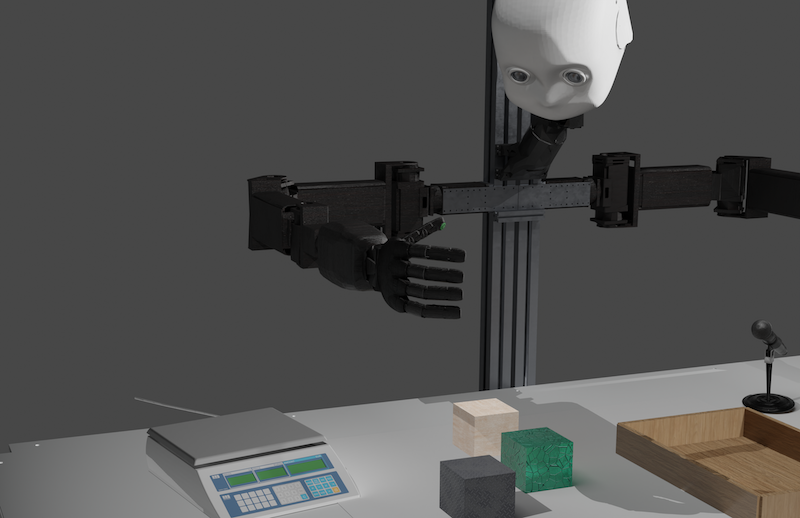
- Matcha agent manipulates objects with different sound, weights and haptics to determine their materials.
- NICOL robot from Knowledge Technology Group, University of Hamburg.
- In CoppeliaSim simulator, must be v4.4! (We provide this version since the coppeliasim official website won't provide this anymore).
- Please turn on your speaker to hear the sound!
The experimental task is designed on top of RLBench, but with a replacement of our own NICOL robot, a desktop-based humanoid robot.
git clone git@github.com:xf-zhao/Matcha-agent.git
# option 1: manually install coppeliasim v4.4 and
cd Matcha-agent && pip install -r NICOL/requirements.txt

# option 2: inside docker
docker build --progress=plain -t matcha-agent:latest .
docker container run -it --privileged --gpus all --net=host --entrypoint="" -v /tmp/.X11-unix:/tmp/.X11-unix -e DISPLAY=$DISPLAY matcha-agent /bin/bash
Run NICOL demo with RLBench tasks
python3 NICOL/demo.pyThe visual detection is done with ViLD, an open-vocabulary detection model. Despite of the simplicity of the vision in our demo, we use ViLD with a consideration of better generalization.
Install ViLD requirements
Since the library dependencies of ViLD may highly conflict with other packages installed, we encourage to install ViLD model within a separated environment and launch it as a http server.
conda create -n vild python=3.9
conda activate vild
pip install -r requirements.txt
# Download weights
gsutil cp -r gs://cloud-tpu-checkpoints/detection/projects/vild/colab/image_path_v2 ./sh launch_vild_server.shThe ViLD server will be ready under: 0.0.0.0:8848/api/vild
The sound module requires PyTorch, TorchAudio and other sound related packages that may conflict with the robotic and vision configurations. Like for vision module, we also deploy this module within an independent environment.
conda create -n sound python=3.9
conda activate sound
pip install -r requirements.txtWe train a sound classification neural network.
python train.pyThis training process includes
- Load the auditory
train/testdataset (.wav) - Train a neuralnetwork with augmented
traindataset - Evaluate on the
testdataset - Save the best performance model weights (
best_model.ckpt), which will be loaded for the sound server as API. See also this blog for reference.
sh launch_sound_server.shThe sound server will be ready under: 0.0.0.0:8849/api/sound
In the original Matcha-agent paper, we use openai API text-davinci-003 and text-ada-001 as the backend LLMs. Nowadays, there are many open-sourced LLMs available. In the version v1.0 release, we use Vicuna-13b model followed with this FastChat doc.
Note that the LLM is worked in a completions mode instead of chat completions mode, i.e. no role-plays since we manually introduce roles in the prompts.
python main.pyOptional parameters:
engine: The backend LLM to run, such as [text-davinci-003,Vicuna-13b,gpt-3.5-turbo, ...] ...
-
If an error
ImportError: /usr/lib/x86_64-linux-gnu/libstdc++.so.6: version 'GLIBCXX_3.4.29' not found.occurs:conda install libgcc export LD_LIBRARY_PATH=$LD_LIBRARY_PATH:/home/${YOUR_USER_NAME}/anaconda3/envs/nicol/lib
see also: BVLC/caffe#4953
The 3D mesh of NICOL robot configurations of the robot can be found in the *.ttt file. We thank seed robotics for authorizing us sharing and making the RH8D hand models publicly available in this repertory.
@misc{zhao2023chat,
      title={Chat with the Environment: Interactive Multimodal Perception Using Large Language Models},
      author={Xufeng Zhao and Mengdi Li and Cornelius Weber and Muhammad Burhan Hafez and Stefan Wermter},
      year={2023},
      eprint={2303.08268},
      archivePrefix={arXiv},
      primaryClass={cs.RO}
}